Bar QR — scanning and paying for drinks
Updated on 2026-10-01
Settings → Integrations → Guest experience → Bar QR
With Bar QR, you put two QR cards on your fridge or bar:
- "Scan and pay": the guest (also a passer-by or a wellness guest) sees your drinks with photo and price, chooses what they took and pays straight away with Bancontact.
- "Put it on your room bill": an overnight guest taps their room and receives the link to their guest page, where they tick off what they took at the honesty bar.
You see straight away what was bought, with an invoice, instead of a loose payment without explanation on your bank statement.
What do you need?
- Products in the Honesty bar category, preferably with a product photo. See Managing products & extras.
- For payments: a configured Bancontact / WERO tile under Settings → Integrations → Payments. The room page also works without it.
- To send the link via WhatsApp: a connected WhatsApp connection. Without it, the guest can only choose email.
Switching it on
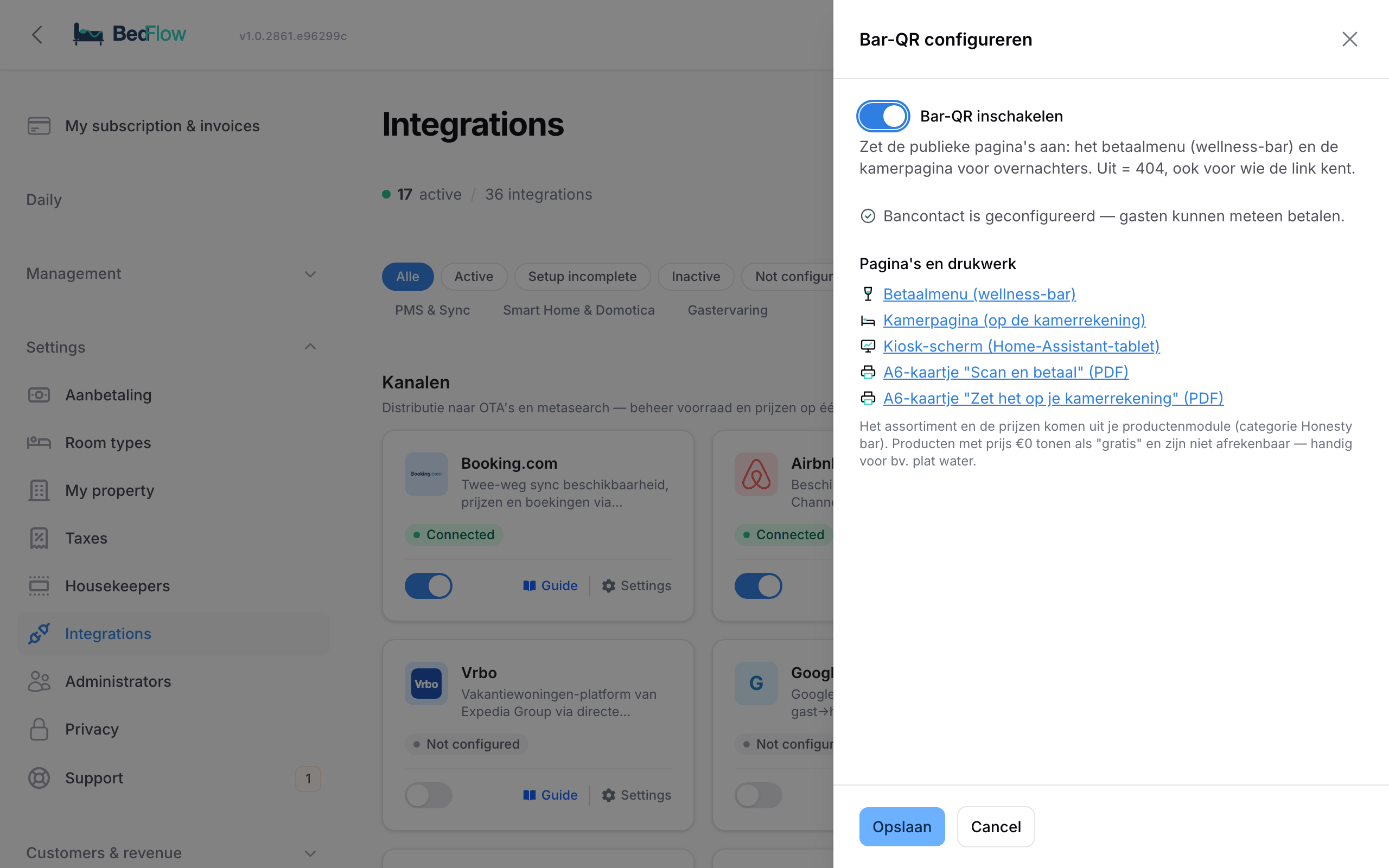
- Go to Settings → Integrations and find the Bar QR tile in the Guest experience category.
- Click Configure.
- Switch on Enable Bar QR and click Save.
If Bancontact has not been set up yet, the window warns you: the payment menu then only shows your drinks and prices, without a payment button. If Bar QR is switched off, the public pages cannot be reached, not even by someone who knows the link.
Pages and print materials
In the same window, under Pages and print materials, you will find:
| Link | What for |
|---|---|
| Payment menu (wellness bar) | The "Fancy a drink?" page where the guest chooses and pays |
| Room page (on the room bill) | The "Took a drink?" page for overnight guests |
| Kiosk screen (Home Assistant tablet) | A screen with a large QR code and your drinks with prices, to show on a tablet at the bar |
| A6 card "Scan and pay" (PDF) | Print-ready card with the QR code to the payment menu |
| A6 card "Put it on your room bill" (PDF) | Print-ready card with the QR code to the room page |
Print the cards and put them on the fridge or at the bar.
Scan and pay
- The guest scans the QR code and sees Fancy a drink? with your products from the Honesty bar category, with photo and price.
- They choose the quantities and tap Pay with Bancontact.
- After payment they see Paid — thank you!. If they want a receipt, they enter their email address under Receipt by e-mail?. BedFlow does not store that address.
What happens on your side:
- The sale immediately gets a final invoice in your regular invoice series, separate from any booking. You will find it in Daily → Invoices.
- All these sales are recorded under one fixed customer, Bar sale (QR), in Management → Customers.
- You get a Bar sale paid notification with the invoice number, the drinks and the total, in your property's Telegram channel and as a push notification in the app. In your Telegram settings, that notification type has its own toggle (Bar QR sales).
- If the guest abandoned the payment, BedFlow cleans up that unpaid order itself after a day.
A product priced at €0 appears on the menu as "free" and cannot be paid for. Handy for still water, for example.
On the room bill
- The overnight guest scans the QR code and sees Took a drink? Put it on your room bill.
- They tap their room, choose By e-mail or By WhatsApp and tap Send me the link.
- If there is an ongoing stay in that room, the guest receives a short message with the link to their guest page. There they tick off what they took at the honesty bar, and it goes onto their invoice.
The message always goes to the email address or mobile number already on the booking. The guest does not type anything in, and the page never reveals who is staying in a room: the response is always the same, even for an empty room.
Languages
The public pages are available in Dutch, English, French and German.
Frequently asked questions
There are no drinks on the menu. Give your products the Honesty bar category and set them to Active under Management → Products.
The menu shows no payment button. Bancontact has not yet been set up for this property, or all your products are priced at €0. Set up the Bancontact / WERO tile under Settings → Integrations → Payments.
What is the difference with the POS? With the POS, you ring up the consumption. With Bar QR, the guest does it themselves, even when there is nobody behind the bar.