Connecting your accounting — Yuki, Peppol, Billit and Octopus
Updated on 2026-10-01
Settings → Integrations → Accounting
BedFlow creates your invoices. With an accounting integration, your final sales invoices and credit notes end up in your accounting software or with your accountant automatically, without exports or forwarded PDFs. Invoices to businesses can also be sent via Peppol.

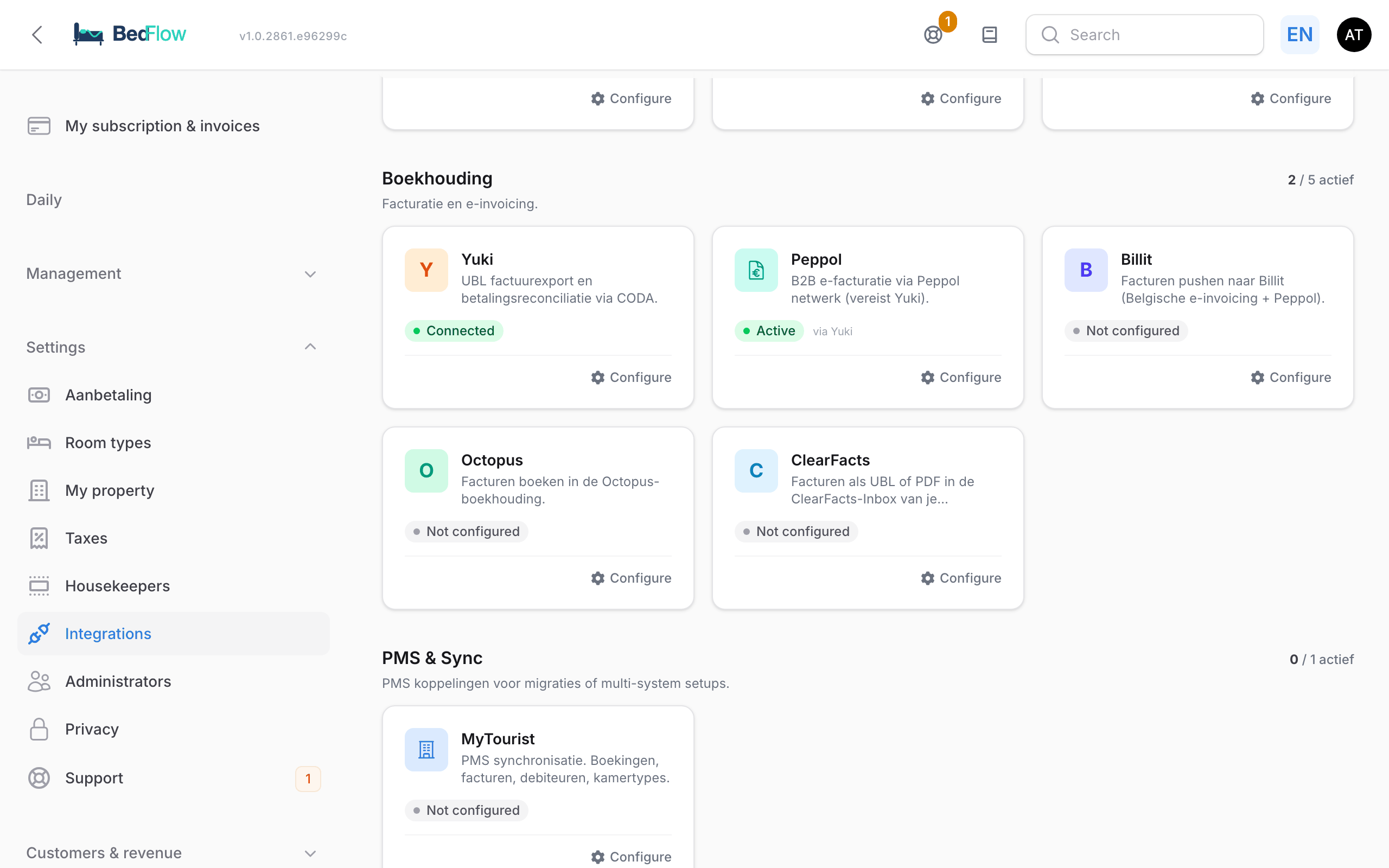
Which package?
| Tile | What the integration does | Invoices via Peppol? | What you need |
|---|---|---|---|
| Yuki | Books your invoices in your Yuki administration | Yes, with the Peppol tile | Administration ID and Access key |
| Peppol | Invoices to businesses via the Peppol network, through Yuki | — | An active Yuki integration |
| Billit | Puts your invoices into Billit | Yes, with the Send via Peppol (B2B) toggle | PartyID and API key |
| Octopus | Books your invoices in the sales journal of your Octopus file | No | Your file ID and your Octopus login |
| ClearFacts | Delivers your invoices to your accountant's Inbox | No | A Personal Access Token — see ClearFacts |
Is your property in Portugal? Then you are required to invoice via InvoiceXpress — see InvoiceXpress (Portugal).
Choose one package per property. If several are switched on anyway, your invoices only go to the first one in this order: Yuki, Billit, Octopus, ClearFacts. If you have several properties, each with its own company or accountant, you set up a separate integration per property. To do so, first select the right property in the property switcher.
Which invoices are included, and when?
- Final invoices and credit notes. Proformas are never included — an invoice is only sent once you have finalised it (see Invoicing).
- Not included: cancelled invoices, and anonymous POS sales without a customer. A POS sale that you linked to a customer is included.
- Every two hours, BedFlow sends whatever is new.
- Once. BedFlow remembers which invoices have been sent, so no duplicates are created.
Note when switching it on: your earlier final invoices that were never sent to that package will then be sent too. If your accountant has already booked them another way, email support@bedflow.eu before you switch on the integration.
Connecting Yuki
- On Settings → Integrations, click Configure on the Yuki tile. The Configure Yuki window slides open.
- In the Yuki account section, fill in:
| Field | What to enter |
|---|---|
| Enable Yuki sync | Switch on once everything else is filled in. |
| Administration ID | The ID of your administration in Yuki. Your accountant or Yuki can give it to you. |
| Yuki environment | Belgium (yukiworks.be) or Netherlands (yukiworks.nl). If this is set wrong, logging in works but Yuki refuses to book ("Domain has no active database"). |
| Access key | Found in Yuki → Beheer (Admin) → API toegang (API access) → Access key. |
- Fill in the collapsed sections IBAN mapping (Bancontact IBAN, Stripe IBAN, Bancontact administration ID) and GL accounts (Default GL account, Tourist tax GL account) if your accountant asks for them.
- Click Save. The tile shows Connected.
Having your online payments (Stripe and Bancontact) matched automatically in Yuki requires extra settings that are not in this window. If you want this, ask via support.
Peppol via Yuki
With Peppol, invoices to businesses are sent electronically, straight into your customer's accounting software. Since 2026 this has been mandatory in Belgium for invoices between businesses.
- Click Configure on the Peppol tile. You get the same window as for Yuki.
- In the Peppol section, switch on the Enable Peppol toggle and click Save.
As long as Yuki is not active, the Peppol tile shows Not configured; below the status it says "via Yuki".
An invoice is sent via Peppol when the customer has a VAT number and can be reached on the Peppol network. The other invoices simply go to Yuki. A company's VAT number is on the customer record, field Tax number (VAT / NIF) (see Customers).
Connecting Billit
- Click Configure on the Billit tile. The Configure Billit window slides open.
- In the Billit account section, fill in:
| Field | What to enter |
|---|---|
| Enable Billit sync | Switch on once everything else is filled in. |
| Production environment | Off = Billit's test environment (sandbox), to try things out safely. On = your real Billit account. |
| PartyID | The Billit company in which invoices are booked. |
| API key | Billit → Profile → Users & API key. |
| Send via Peppol (B2B) | On = invoices to customers with a VAT number are sent over the Peppol network. If the customer is not in the Peppol directory, the invoice simply stays in Billit. |
- Click Save. The tile shows Connected.
BedFlow does not send payments to Billit.
Connecting Octopus
With Octopus you don't share a password with BedFlow: you log in to Octopus itself and give BedFlow access to your file. You can revoke that access again at any time in your Octopus account.
- Click Configure on the Octopus tile. The Configure Octopus window slides open.
- In the Octopus file section, enter your File ID (the file in which invoices are booked), switch on Enable Octopus sync and click Save.
- Open the window again and, in the Connection with Octopus section, click Connect with Octopus.
- Log in to Octopus and confirm access for BedFlow.
After that, the window shows Connected with Octopus, with a reconnect link in case you ever need to renew the access. From then on, BedFlow books your sales invoices in the sales journal of that file.
You don't need the collapsed section Username/password (fallback); leave it empty.
BedFlow does not send your payments to Octopus automatically.
ClearFacts
If your accountant works with ClearFacts, BedFlow puts your invoices into their ClearFacts Inbox. ClearFacts does not send anything to your customers via Peppol. All the steps are in ClearFacts — invoices to your accountant.
Frequently asked questions
An invoice is not in my accounting software. Check in this order: (1) is the invoice final, not a proforma? (2) does the tile show Connected? (3) have two hours passed since you finalised it? Still nothing? Email support@bedflow.eu with the invoice number.
Does my accountant also get the proformas? No. Only final invoices and credit notes are included.
I cancel an invoice. What happens in my package? BedFlow cannot retrieve an invoice that has already been sent. Create a credit note; it will be included in the next round.
I am switching to another package. Switch off the toggle of the old package and set up the new one. Anything already sent stays in the old package. Remember the warning above: invoices that were never sent to the new package are sent when you switch it on.
Do my invoices stay in BedFlow? Yes. Your accounting software receives a copy; BedFlow remains the place for your invoices, PDFs and payment follow-up.