House-manager digest via WhatsApp
Updated on 2026-10-01
Daily → House-manager digest
Does someone else look after your property on site, such as a house manager, cleaning supervisor or caretaker? That person doesn't want to log in to BedFlow, but simply wants to see on WhatsApp who is coming and going. The house-manager digest sends a compact overview of arrivals, departures and guests in house at a fixed time, with exactly the information you tick.
What do you need?
- The Starter plan or higher, and the Cleaning schedule permission if you work with several users.
- A connected WhatsApp connection. Without a connection, the page shows the message No WhatsApp connected yet — nothing is being sent, with the button Connect WhatsApp.
The housekeeping module doesn't need to be switched on for this.
Setting it up
The settings apply per property. If you have several properties, first choose the right property at the top of the sidebar.
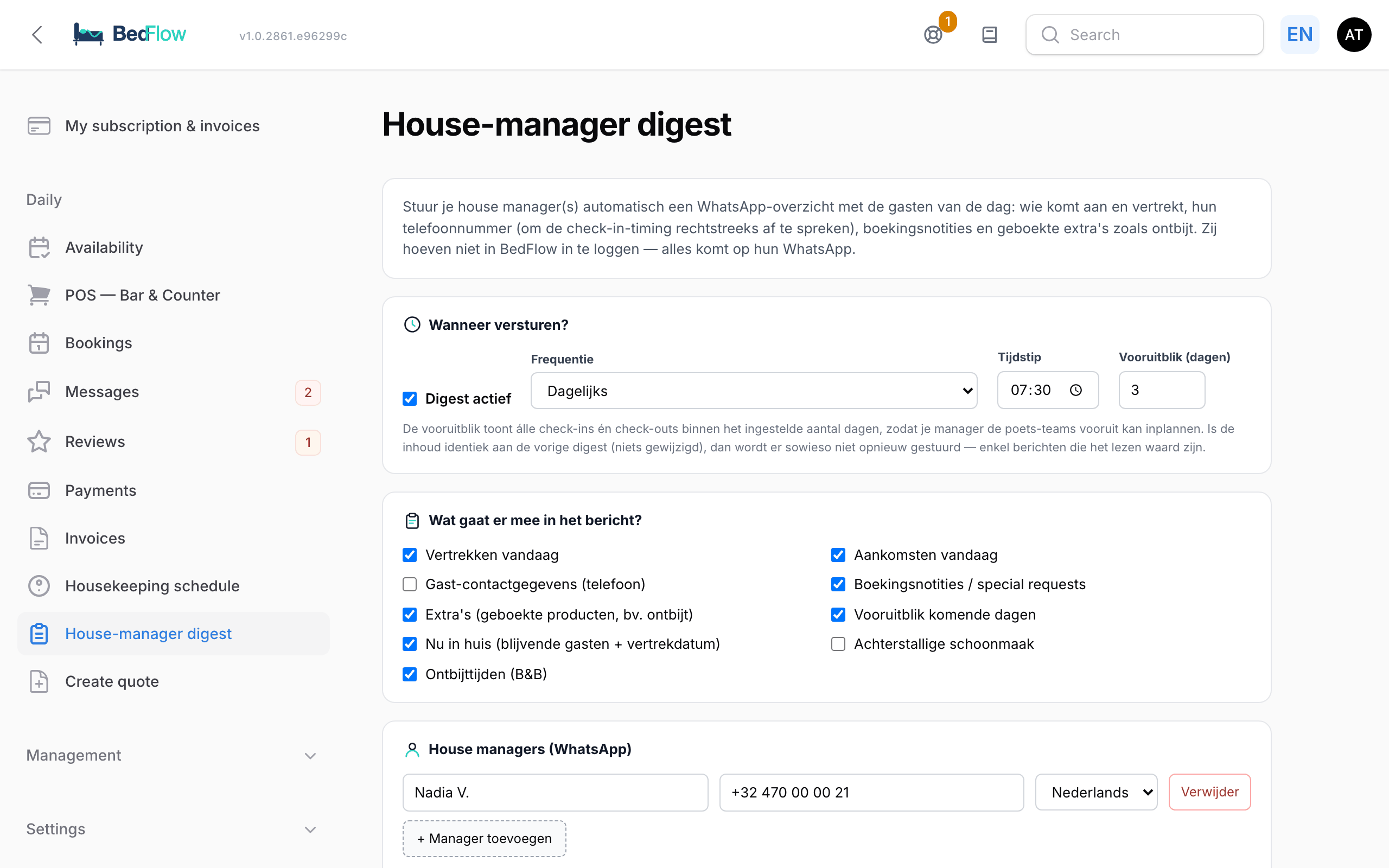
- Go to Daily → House-manager digest.
- Under When to send?, tick the Digest active box and choose:
| Field | Options | Default |
|---|---|---|
| Frequency | Daily, Weekly (choose day) or Only when there is something to report (today or in the look-ahead) | |
| Day | Weekly only: Monday to Sunday | Saturday |
| Time | The time at which the message goes out | 07:30 |
| Look-ahead (days) | How many days ahead the message looks, from 0 to 14 | 3 |
- Under What goes into the message?, tick the sections (see below).
- Under House managers (WhatsApp), add each manager with + Add manager: name, mobile number in international format (e.g. +32475123456) and language (Nederlands, English, Français, Deutsch or Português).
- Click Save.
With Send a test message now, all your managers immediately receive today's overview, so you can see what it looks like. This doesn't change the fixed time.
Frequency, time, look-ahead and sections apply to all managers of that property. Only the language is chosen per manager.
What's in the message?
| Section | Default |
|---|---|
| Departures today | on |
| Arrivals today | on |
| Guest contact details (phone) | on |
| Booking notes / special requests | on |
| Extras (booked products, e.g. breakfast) | on |
| Look-ahead for the coming days | on |
| Currently staying (staying guests + departure date) | on |
| Overdue cleaning | off |
| Breakfast times (B&B) | off |
Depending on what you tick, each guest entry shows: the name and phone number (so your manager can arrange the arrival time themselves), the room, the number of guests and nights, the departure date, the country and the check-in and check-out times (including different times per unit).
In addition, where applicable:
- a warning when a guest leaves and the next one arrives the same day: the room then has to be cleaned in between;
- an approved or requested early check-in;
- the booked extras;
- the booking's internal note, before the guest's remarks. The guest never sees that note, but your manager does, as long as Booking notes / special requests is switched on.
At the bottom is a short link to the full schedule (see below).
When is no message sent?
- If there is no arrival or departure today and nothing has changed in the schedule since the previous message, BedFlow sends nothing. Your manager only gets messages that are worth reading.
- With Only when there is something to report, something is only sent if there is an arrival or departure today or within the look-ahead.
The schedule portal (6 months ahead)
At the bottom of every message is a short link to a secure schedule page with the same information in a clear layout: Today, Currently staying and Next 6 months. Handy for planning cleans well in advance.
The page is protected with a 6-digit code that is sent via WhatsApp to the manager's number (Send code via WhatsApp). The code is valid for 10 minutes. After that, your manager stays signed in for 12 hours on that device. That way they don't need to remember a password, and a forwarded link can't be opened by someone else.
If you remove a manager, their link stops working.
"Sent, but not delivered"
WhatsApp doesn't deliver a first message to someone who has never messaged your number themselves. If BedFlow sees that messages to a number aren't arriving, the message Sent, but not delivered appears at the top, with the number.
The fix takes ten seconds: have your manager send "hello" once to your property's WhatsApp number. After that, the messages arrive normally.
Tips
- If your manager replies on WhatsApp, that reply ends up in your guest inbox.
- Want to pass on internal info ("guest arriving late", "allergy")? Put it in the booking's internal note.